Release Notes
Getting started
DE-CIX Access
Overview and technical specifications
Create a new Access or LAG
Monitor your Access
Delete your Access
GlobePEER
Overview GlobePEER
Create your GlobePEER service
Manage your GlobePEER service
Delete your GlobePEER service
Blackholing Services
Route Service
Route Server Guides
DE-CIX ASEAN GlobePEER Route Server Guide
DE-CIX Barcelona GlobePEER Route Server Guide
DE-CIX Chicago GlobePEER Route Server Guide
DE-CIX Copenhagen GlobePEER Route Server Guide
DE-CIX Dallas GlobePEER Route Server Guide
DE-CIX Dusseldorf GlobePEER Route Server Guide
DE-CIX Esbjerg GlobePEER Route Server Guide
DE-CIX Frankfurt GlobePEER Route Server Guide
DE-CIX Hamburg GlobePEER Route Server Guide
DE-CIX Helsinki GlobePEER Route Server Guide
DE-CIX Houston GlobePEER Route Server Guide
DE-CIX Istanbul GlobePEER Route Server Guide
DE-CIX Jakarta GlobePEER Route Server Guide
DE-CIX Kristiansand GlobePEER Route Server Guide
DE-CIX Kuala Lumpur GlobePEER Route Server Guide
DE-CIX Leipzig GlobePEER Route Server Guide
DE-CIX Lisbon GlobePEER Route Server Guide
DE-CIX Madrid GlobePEER Route Server Guide
DE-CIX Malaysia GlobePEER Route Server Guide
DE-CIX Marseille GlobePEER Route Server Guide
DE-CIX Mexico GlobePEER Route Server Guide
DE-CIX Munich GlobePEER Route Server Guide
DE-CIX New York GlobePEER Route Server Guide
DE-CIX Oslo GlobePEER Route Server Guide
DE-CIX Palermo GlobePEER Route Server Guide
DE-CIX Phoenix GlobePEER Route Server Guide
DE-CIX Richmond GlobePEER Route Server Guide
DE-CIX Rio De Janeiro GlobePEER Route Server Guide
DE-CIX Sao Paulo GlobePEER Route Server Guide
ACIX GlobePEER Route Server Guide
AF-CIX GlobePEER Route Server Guide
AqabaIX GlobePEER Route Server Guide
Borneo-IX GlobePEER Route Server Guide
Doha IX Route Server Guide
IRAQ-IXP Route Server Guide
Penang IX Route Server Guide
PIE Karachi GlobePEER Route Server Guide
Ruhr-CIX GlobePEER Route Server Guide
SEECIX GlobePEER Route Server Guide
UAE-IX GlobePEER Route Server Guide
SH-IX Dubai Route Server Guide
DE-CIX Stockholm GlobePEER Route Server Guide
SH-IX Fujairah Route Server Guide
Action BGP Communities (Route Server Control)
DE-CIX GlobePEER Route Server Action BGP Communities
ACIX GlobePEER Route Server Action BGP Communities
AF-CIX GlobePEER Route Server Action BGP Communities
AqabaIX GlobePEER Route Server Action BGP Communities
Borneo-IX GlobePEER Route Server Action BGP Communities
IRAQ-IXP Route Server Action BGP Communities
PIE Karachi GlobePEER Route Server Action BGP Communities
Ruhr-CIX GlobePEER Route Server Action BGP Communities
SEECIX GlobePEER Route Server Action BGP Communities
UAE-IX GlobePEER Route Server Action BGP Communities
Doha IX Route Server Action BGP Communities
SH-IX Fujairah Route Server Action BGP Communities
SH-IX Dubai Route Server Action BGP Communities
Informational BGP Communities (Route Details)
DE-CIX GlobePEER Route Server Informational BGP Communities
ACIX GlobePEER Route Server Informational BGP Communities
AF-CIX GlobePEER Route Server Informational BGP Communities
AqabaIX GlobePEEER Route Server Informational BGP Communities
Borneo-IX GlobePEER Route Server Informational BGP Communities
IRAQ-IXP Route Server Informational BGP Communities
PIE Karachi GlobePEER Route Server Informational BGP Communities
Ruhr-CIX GlobePEER Route Server Informational BGP Communities
SEECIX GlobePEER Route Server Informational BGP Communities
UAE-IX GlobePEER Route Server Informational BGP Communities
SH-IX Dubai Route Server Informational BGP Communities
SH-IX Fujairah Route Server Informational BGP Communities
Doha IX Route Server Informational BGP Communities
Looking Glass Guides
DE-CIX GlobePEER Looking Glass Guide
ACIX GlobePEER Looking Glass Guide
AF-CIX GlobePEER Looking Glass Guide
AqabaIX GlobePEER Looking Glass Guide
Borneo-IX GlobePEER Looking Glass Guide
IRAQ-IXP Looking Glass Guide
PIE Karachi Looking Glass Guide
Ruhr-CIX GlobePEER Looking Glass Guide
SEECIX GlobePEER Looking Glass Guide
UAE-IX GlobePEER Looking Glass Guide
SH-IX Dubai Looking Glass Guide
SH-IX Fujairah Looking Glass Guide
Doha IX Looking Glass Guide
Notes on additional Routes (incl. Google VPP) via GlobePEER Route Service
Closed User Groups
DirectCLOUD
Overview and Monitoring
Cloud Connections
DirectCLOUD for Microsoft Azure
Create DirectCLOUD Connection for Azure
How to order a DirectCLOUD connection for Azure
Create or upgrade Gateways for your Azure ExpressRoute
Manage your Azure Cloud Connection
Upgrade / downgrade a DirectCLOUD service for Azure
Change DirectCLOUD configurations for Azure
Delete DirectCLOUD configurations for Azure
Monitoring Azure ExpressRoute uptime
Monitor your connection
Updating the Cloud Key for Your Azure DirectCLOUD Service
Delete your Azure Cloud connection
FAQ DirectCLOUD for Microsoft Azure
DirectCLOUD for AWS
Create DirectCLOUD connection for AWS
Manage your DirectCLOUD connection for AWS
Upgrade / downgrade the connection
Change DirectCLOUD configurations for AWS
Delete DirectCLOUD configurations for AWS
Monitoring AWS DirectConnect uptime
Monitor your connection
Delete your AWS Cloud connection
DirectCLOUD for IBM
Create DirectCLOUD connection for IBM
Manage your DirectCLOUD connection for IBM
Upgrade / downgrade a DirectCLOUD service for IBM
Change DirectCLOUD configurations for IBM
Delete DirectCLOUD configurations for IBM
Monitor your connection
Delete your IBM Cloud connection
DirectCLOUD for GCloud
Create DirectCLOUD connection for GCloud
Manage your DirectCLOUD connection for GCloud
Upgrade / downgrade the connection
Change DirectCLOUD configurations for GCloud
Delete DirectCLOUD configurations for GCloud
Monitor your connection
Delete your GCloud connection
DirectCLOUD for Oracle
Cloud ROUTER
Overview & use cases
Create / Manage your Cloud ROUTER
Create / Manage the configurations
Add a configuration
Upgrade / downgrade a configuration
Change your Cloud ROUTER configurations
Monitor your configurations
Delete a Cloud ROUTER configuration
Advanced Settings Cloud ROUTER
VirtualPNI
Overview VirtualPNI
Create your VirtualPNI
Order and configure your VirtualPNI between your own resources
Order and configure your VirtualPNI to a third-party provider
Manage your VirtualPNI
Upgrade / Downgrade your VirtualPNI service
Change VirtualPNI configurations
Delete VirtualPNI configurations
Monitor your VirtualPNI
Delete your VirtualPNI service
Colocation
Out-of-band access to your DE-CIX colocated equipment
Shipping Information
Colocation equipment management for Digital Realty data centers
DE-CIX API
Overview DE-CIX API
Quick API Reference
Cloud ROUTER Postman Collection
Monitor and Visibility of Learned Routes and Advertised Routes by API
BGP Ingress and Egress Filters Usage by API
Terraform Provider
Terraform Provider Overview
Getting Started
Provider Configuration
Managing Services
State Management
End-to-End Example
Virtual PNI with a Foreign Port (Terraform)
Service Insights System
Service Insights System - Tutorial
Standard customer Service Insights Tutorial (for customers without reselling services or DaaS location)
Service Telemetry Insights Tutorial
GlobePEER Traffic Insights Tutorial
GlobePEER Threat Insights Tutorial
Cloud ROUTER Traffic Insights Tutorial
Reseller Service Insights Tutorial
Reseller GlobePEER Traffic Insights Tutorial
Reseller GlobePEER Threat Insights Tutorial
Reseller Service Telemetry Insights Tutorial
Partner (DaaS) Service Insights Tutorial
Partner GlobePEER Traffic Insights Tutorial
Partner Service Telemetry Insights Tutorial
Partner GlobePEER Threat Insights Tutorial
Service Insights Tutorial - General Informations
Service Insights System
Account administration
Add new users or subcustomers
Manage user roles and permissions
Multi-Factor-Authentification
Retrieving username and reset password
Delete a user
Customer service and ticket system
- All Categories
- Cloud ROUTER
- Overview & use cases
- Cloud ROUTER use cases
Cloud ROUTER use cases

Cloud ROUTER connects cloud environments and on-premises infrastructure through a single virtual Layer 3 routing instance. The scenarios below show the most common ways customers put it to work. Each one follows the same structure — Scenario → How it works → What you configure → How to validate — so you can map your own setup to the closest pattern.
# | Use case | Scope |
1 | Cloud-to-Cloud Routing | Connect two cloud environments privately |
2 | Hybrid Cloud | Connect on-premises infrastructure with the cloud |
3 | Multi-Cloud with Routing Policies | Connect several clouds with controlled route propagation |
4 | Migration / Data Transfer | Move large data volumes between clouds, temporarily |
Cloud-to-Cloud Routing
Scenario
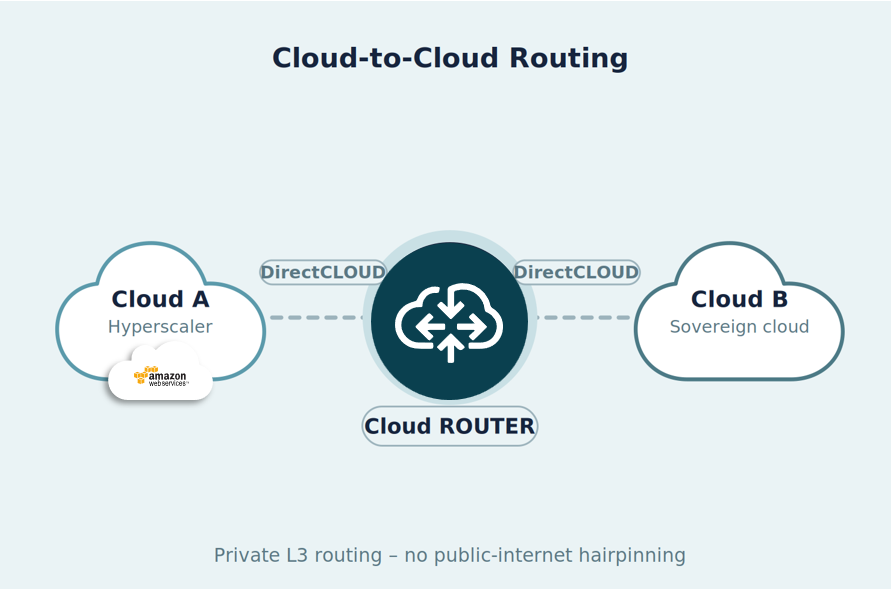
A customer runs workloads in two different cloud environments — for example, compute and analytics resources in a hyperscaler environment and additional workloads in a sovereign or special-purpose cloud. These resources live within the customer's own cloud tenants (VPC/VNet) and need to exchange data privately and with low latency, without traversing the public internet.
How it works
A single Cloud ROUTER instance hosts two DirectCLOUD connections — one to each cloud environment. Traffic is routed directly between the two clouds at Layer 3, avoiding hairpinning or backhaul through a third location. The result is lower latency and reduced cloud egress costs compared to internet-based connectivity.
What you configure
- One Cloud ROUTER instance — see Create a Cloud ROUTER
- Two DirectCLOUD configurations, one per cloud environment
- A BGP session between Cloud ROUTER and each cloud's virtual gateway
How to validate
Confirm both BGP sessions are up in the Portal and check that prefixes from each cloud are learned on Cloud ROUTER and advertised to the opposite connection.
Hybrid Cloud
Scenario
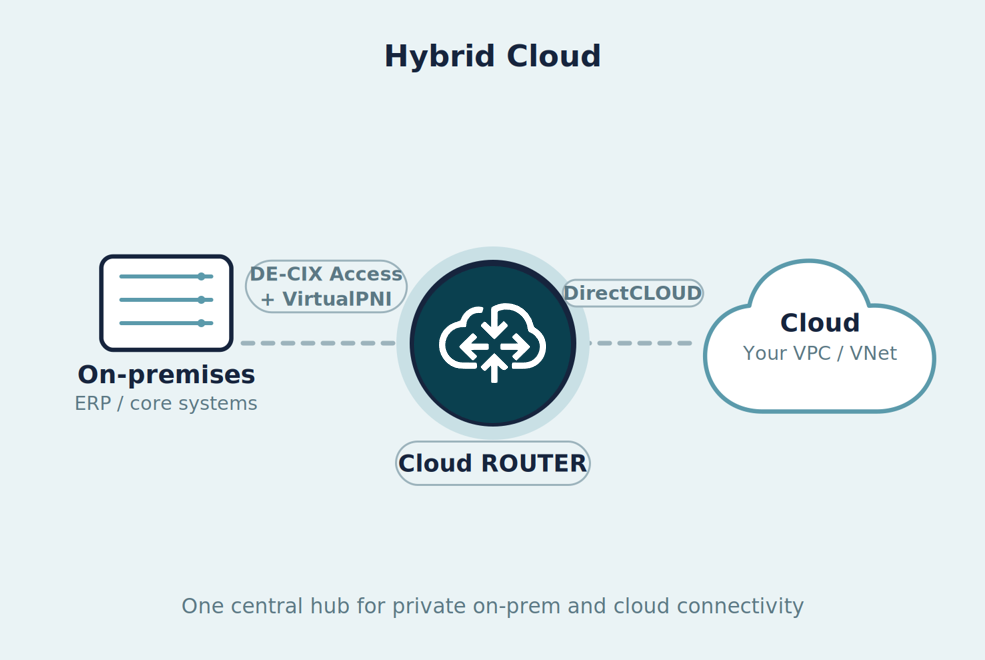
A manufacturing company keeps its ERP and core systems in its own data center for compliance and latency reasons, while running analytics and database workloads in its own cloud environment for scalability. The on-premises systems need private, reliable access to those cloud-side workloads — which the customer operates within its own VPC/VNet, not as a third-party SaaS service.
How it works
Cloud ROUTER acts as the central hub. The on-premises site connects through a physical DE-CIX Access port, linked to Cloud ROUTER via VirtualPNI; the cloud side connects via DirectCLOUD. All routing happens centrally on the Cloud ROUTER, so a single instance serves both the private and the cloud leg.
When do I need which connection?
Component | Purpose | When you need it |
DE-CIX Access | Physical port into the DE-CIX platform at a data center | Whenever you connect on-premises / physical equipment |
VirtualPNI | Private connection from your Access to Cloud ROUTER | To bring your Access into the Cloud ROUTER |
DirectCLOUD | Cloud on-ramp to a CSP | For every cloud environment you connect |
What you configure
- A DE-CIX Access at your data center location
- A VirtualPNI configuration between your Access and the Cloud ROUTER (see also Overview VirtualPNI)
- One or more DirectCLOUD configurations to your cloud environments (see also Overview DirectCLOUD)
How to validate
Verify the VirtualPNI and DirectCLOUD BGP sessions are established, then confirm on-premises prefixes are reachable from the cloud side and the cloud prefixes from on-premises.
Multi-Cloud with Routing Policies
Scenario
A financial services provider connects several cloud environments to a single Cloud ROUTER but, for regulatory and segmentation reasons, must control exactly which routes are exchanged between them. Simply connecting the clouds is not enough — route propagation has to be governed.
How it works
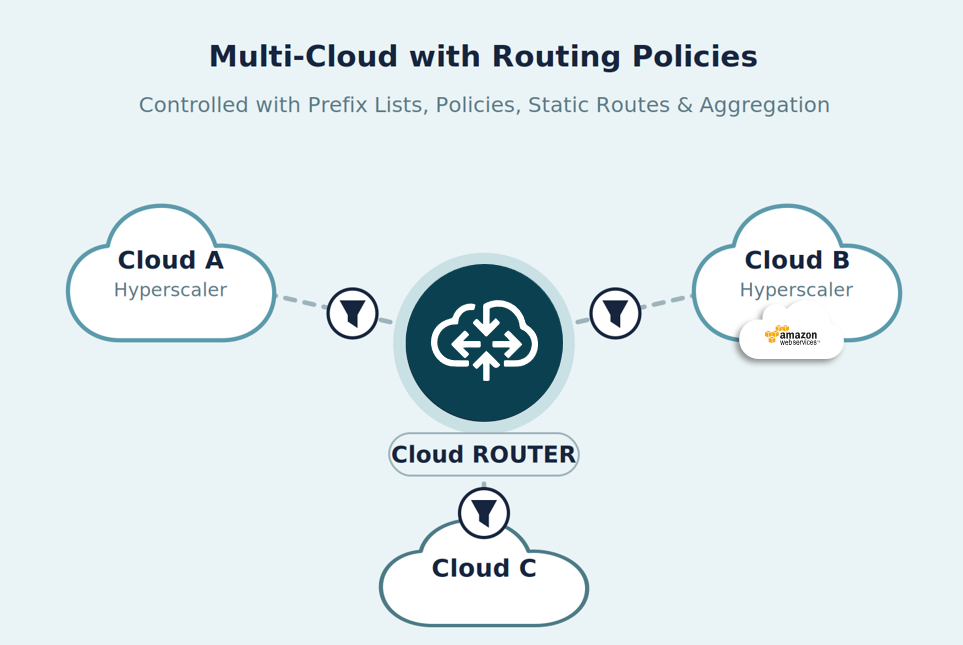
Cloud ROUTER connects all cloud environments centrally and gives you fine-grained control over route propagation. You decide which prefixes are advertised to which connection, summarize routes where needed, and keep environments segmented. The control mechanisms available on every Cloud ROUTER are:
- Prefix Lists & Policies — accept or reject prefixes per connection (inbound/outbound)
- Static Routes — explicitly defined routes
- Route Aggregation — summarize many more-specific prefixes into a single prefix
Mini-example
Cloud A advertises a large set of more-specific prefixes within 10.0.0.0/16, but only the summary route should reach Cloud B. You create an aggregate route for 10.0.0.0/16, auto-generate its prefix list, and apply an export policy on the Cloud B connection that accepts the aggregate and rejects the more-specifics. Cloud B then receives a single, clean prefix while the full detail stays available inside the Cloud ROUTER.
What you configure
How to validate
Compare advertised vs. learned routes per connection in the Portal and confirm each connection only receives its intended prefixes.
Migration / Data Transfer
Scenario
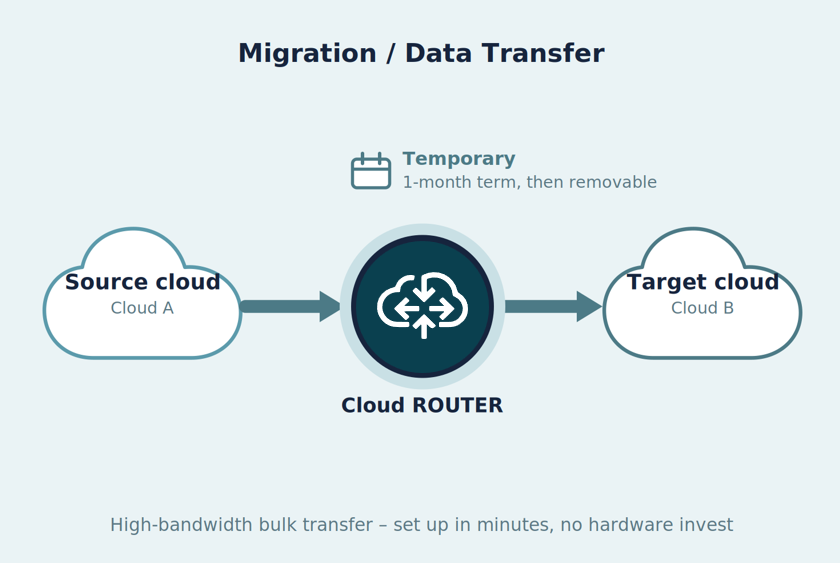
A company needs a private, high-bandwidth path between two cloud environments for a limited time. Typical triggers are a one-off migration or consolidation — for example moving storage and workload data from one cloud environment to another after a merger — or a temporary capacity burst, such as a seasonal compute or analytics peak. In both cases the throughput requirement is high but time-boxed: lots of bandwidth for a defined window, after which the connection can be removed.
How it works
A Cloud ROUTER with two DirectCLOUD connections provides a private, high-bandwidth path between the source and target cloud environments. Because Cloud ROUTER is provisioned in minutes and supports a 1-month contract term, you can spin up the capacity for the window you need and decommission it afterwards — no hardware investment for a temporary requirement.
What you configure
- One Cloud ROUTER instance on a short (1-month) contract term — see Create a Cloud ROUTER
- Two DirectCLOUD configurations — source and target cloud environments
- Bandwidth sized for the window; downgrade or delete the service once it is no longer needed
How to validate
Confirm both BGP sessions are up and monitor throughput during the transfer in the Portal.
Going further: controlling routes at scale
For a detailed, real-world walkthrough of using route aggregation to stay within a hyperscaler's maximum-prefix limit — a common requirement in multi-cloud setups like the one above — see the Example: Reducing AWS Prefix Count with Route Aggregation section in Static Routes & Route Aggregation.
