Static Routes & Route Aggregation

Static Routes & Route Aggregation
Overview
Static Routes and Route Aggregation extend the routing capabilities of the DE-CIX Cloud ROUTER by allowing customers to explicitly define routes and to summarize multiple prefixes into a single aggregate route. This helps to control route propagation, reduce routing table size, and address prefix limitations imposed by connected cloud service providers.
Typical use cases include:
- Reducing the number of advertised prefixes towards hyperscalers (e.g. AWS prefix limits)
- Improving routing stability by preventing BGP session resets
- Maintaining detailed internal routing while advertising summarized routes externally
Static Routes and Route Aggregation can be configured via the Cloud ROUTER Portal and via the Cloud ROUTER API.
Concepts
Cloud ROUTER Architecture and Routing Behavior
A Cloud ROUTER represents a single logical routing instance that can span multiple locations depending on the attached connections.
Customers interact with the Cloud ROUTER by attaching connections (services), such as:
- DirectCLOUD connections to cloud service providers
- VirtualPNI connections towards a port in a data center
The Cloud ROUTER automatically extends to all locations where such connections are attached.
From a routing perspective:
- Static and Aggregate Routes are defined once per Cloud ROUTER
- They are instantiated wherever the Cloud ROUTER has active connections
- Routing behavior is consistent across all attached connections
- Route policies can be used to introduce specific import and export behaviours for routes to and from the BGP Peers
- A next hop for the packet is selected based on the route table on the most specific Prefix that is covering the target IP. If there are multiple entries the next hop is selected based on the route type in the following order:
- Direct attached networks (Point-To-Point networks used to connect to the BGP Peer)
- Static Routes
- Aggregate Routes
- BGP Routes (Routes learned from BGP Peers)
This abstraction allows customers to manage routing centrally without needing to be aware of the underlying network implementation.
Static Routes
A static route is a manually defined route for a specific IP prefix.
In Cloud ROUTER:
- Static routes are created once per Cloud ROUTER
- They are initially active on all connections of the Cloud ROUTER
- Non-aggregate static routes:
- Are associated with one specific service
- Require a next-hop (usually the BGP neighbor of the service)
Static routes become effective on all edges where the Cloud ROUTER is instantiated.
Aggregate Routes
Aggregate routes summarize multiple more-specific prefixes into a single, less-specific prefix.
Key characteristics:
- No next-hop is configured manually
- Are created once and applied globally across the Cloud ROUTER
- Are not defined in the "summary only" mode. Explicit route policies are required to only advertise aggregate routes. See the example at the end of this page
Both static and aggregate routes are, by default, present on all Cloud ROUTER connections.
Prefix Lists and Policies
Routing policies are used to control where static and aggregate routes are advertised.
Typical behavior:
- Static and aggregate routes exist on all connections
- Reject policies are applied on connections where the routes should not be advertised
- Accept policies are applied on connections where only selected routes (e.g. aggregates) should be announced
When creating an aggregate route, Cloud ROUTER can automatically generate a prefix list matching the aggregated prefix. This prefix list can then be reused in routing policies to efficiently control route propagation.
Portal Configuration
Accessing Static Routes
- Open the Cloud ROUTER in the Portal
- Navigate to Advanced Settings
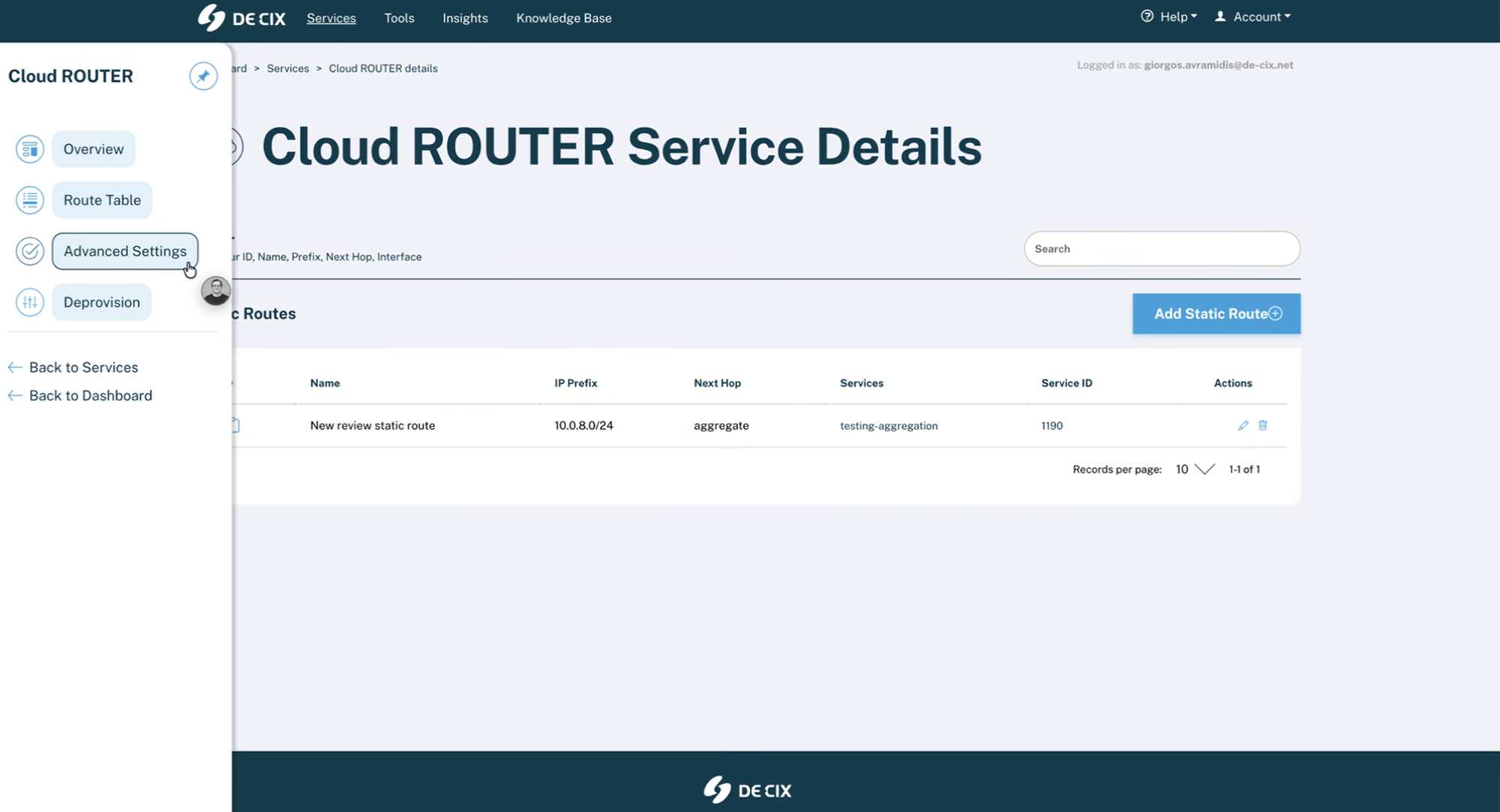
- Select Static Routes
Static Routes allow you to explicitly define routes and aggregated prefixes that are applied across your Cloud ROUTER.
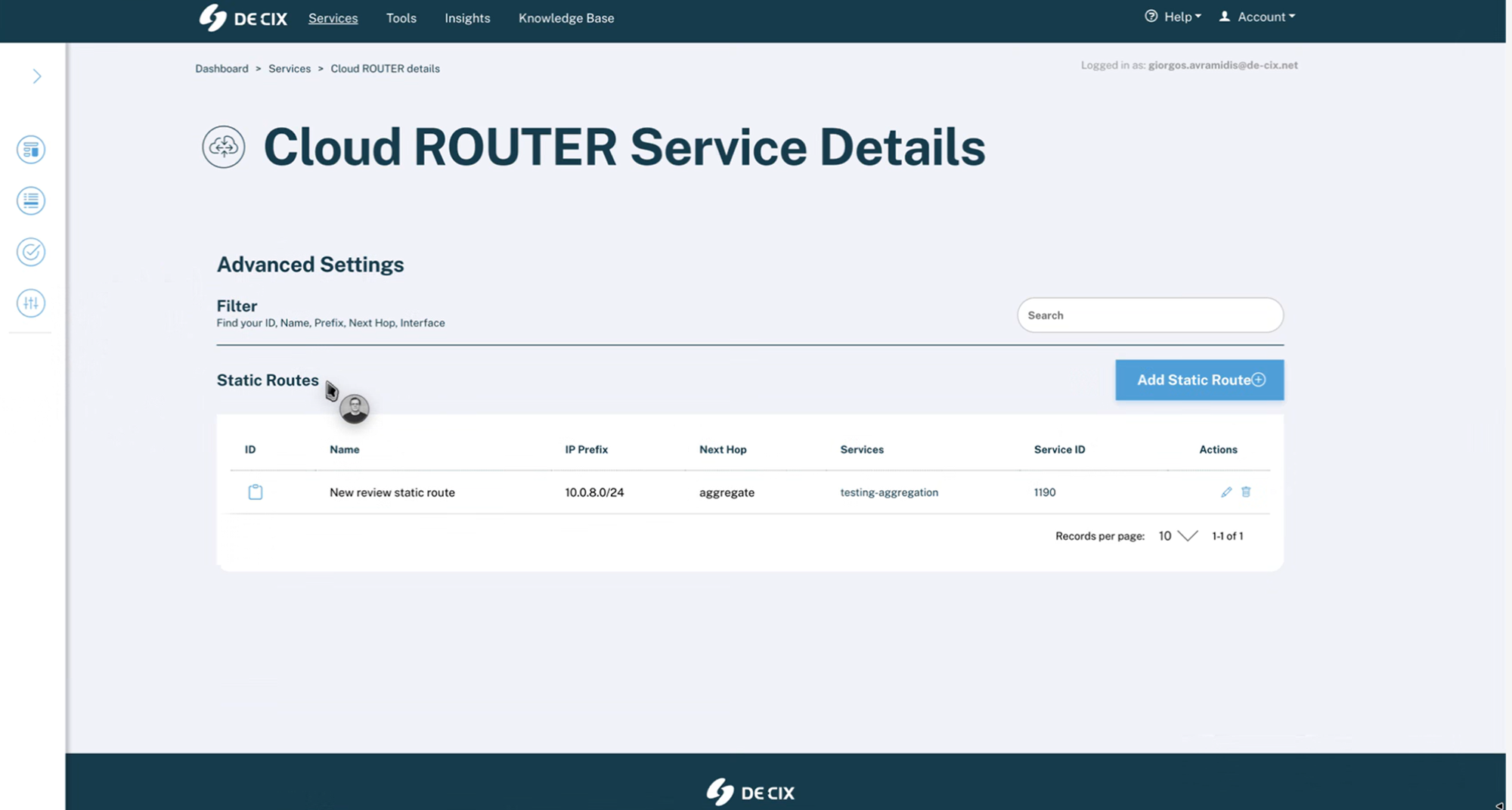
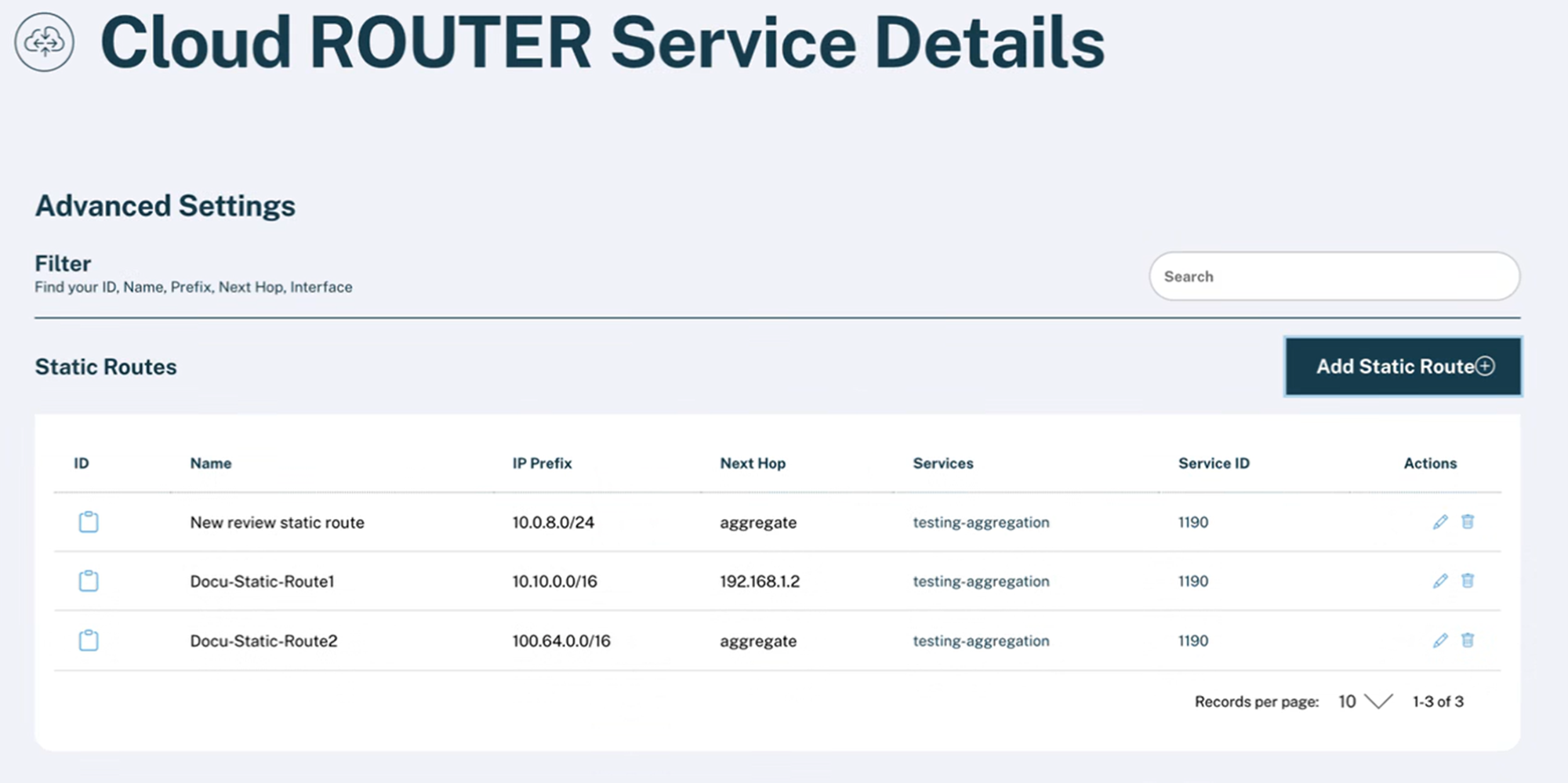
The table shows all configured static and aggregate routes, including:
- Route name
- IP prefix
- Aggregated prefix (if applicable)
- Next-hop (for non-aggregate routes)
- Associated services
Routes can be searched by name or IP prefix.
Creating a Static Route
- Click Add Static Route
- Enter a name for the route
Route Name: Use a descriptive name to identify the purpose of the static or aggregate route.
- Select the IP prefix
IP Prefix: The IP prefix that will be routed or aggregated by the Cloud ROUTER.
CAUTION: Static and aggregate routes take preference over BGP learned routes and might black-hole the traffic in case of aggregate routes. Please announce more specific routes from your BGP Peers to route them in the network
- Choose whether the route is an aggregate route
Aggregate Route: Aggregate routes summarize multiple more-specific prefixes into a single prefix and do not require a next-hop.
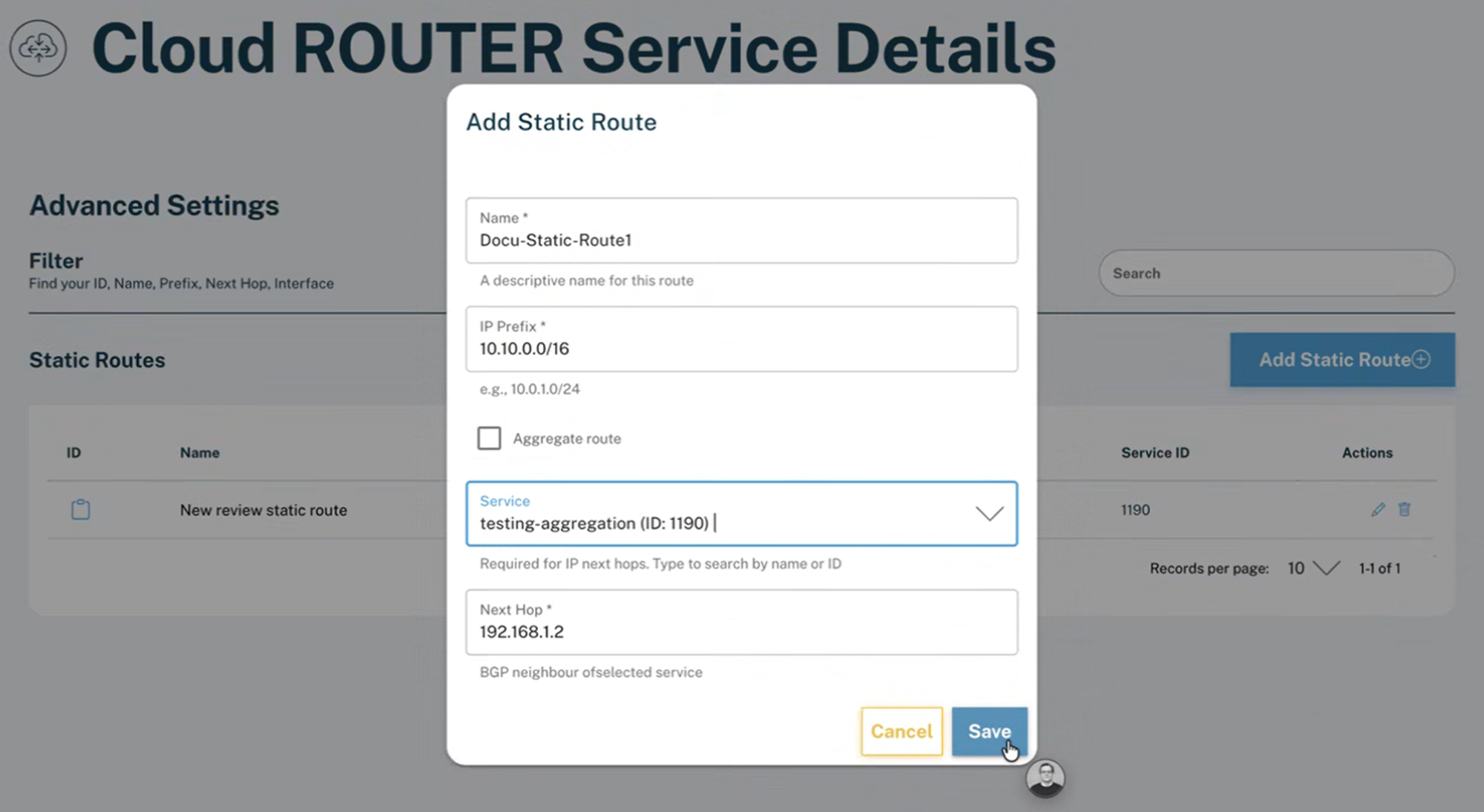
Non-Aggregate Route
- Select one service
- Define the next-hop (pre-filled with the service BGP neighbor)
Next Hop: The BGP neighbor address of the selected service. This value can be adjusted if required.
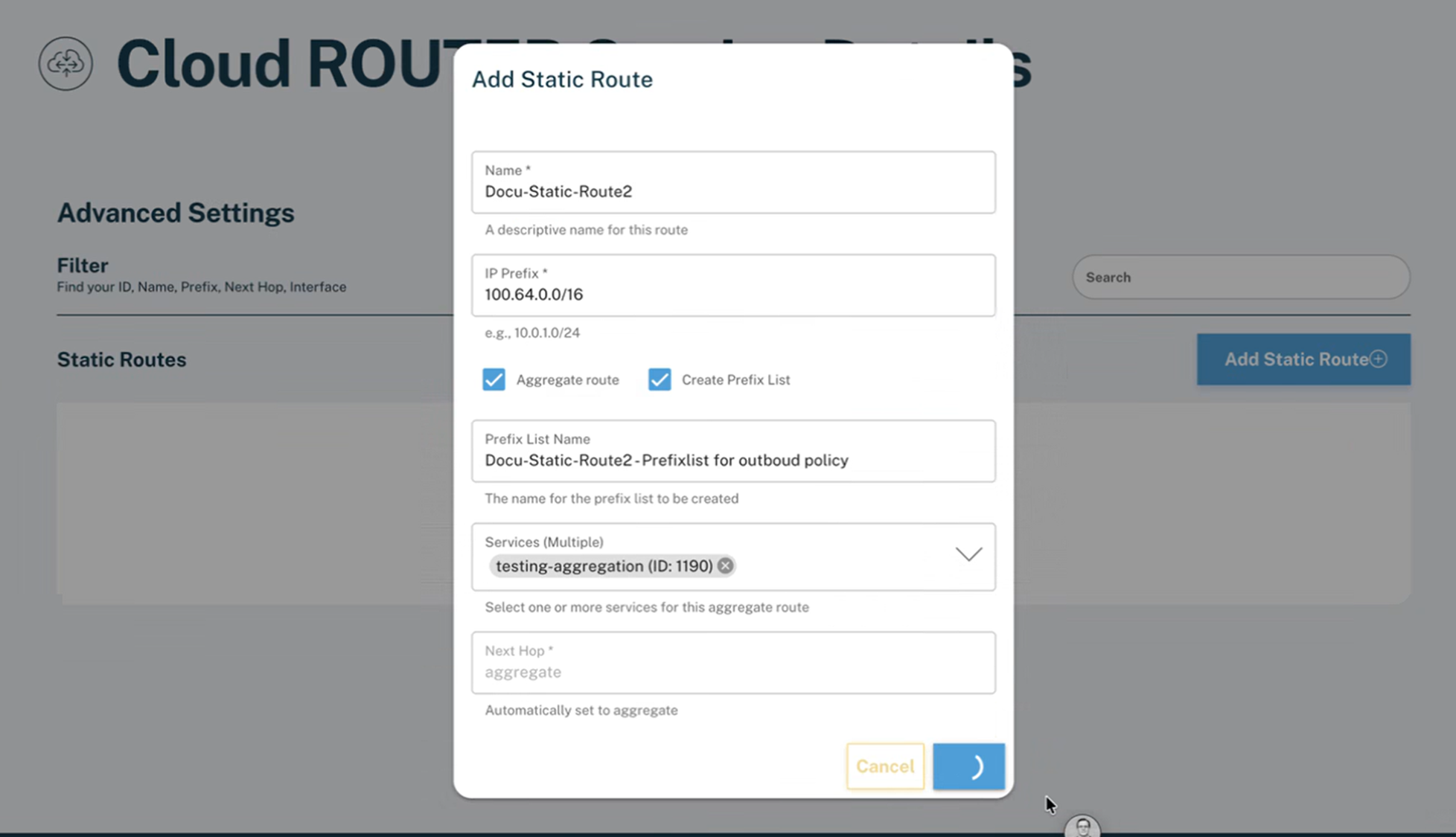
Aggregate Route
- Select one or more services
Please note that the aggregate route will be added to the global route table of the Cloud ROUTER and affects all services
- No next-hop is required
Select the services for which this aggregate route should be enabled. The route itself exists globally on the Cloud ROUTER.
- Optionally enable automatic prefix list creation
Automatic Prefix List: Automatically creates a prefix list for the aggregated prefix to simplify policy configuration.
- Save the configuration
The route will be provisioned automatically and applied across all Cloud ROUTER connections.
You can find and manage your aggregate and non-aggregate static routes in the Static Routes overview.
Automatic Prefix List Creation
If enabled, a prefix list for the aggregate prefix is created automatically. This prefix list:
- Matches the aggregated prefix
- Can be edited or deleted like any manually created prefix list
- Can be referenced in routing policies
No policies are assigned automatically.
Policies
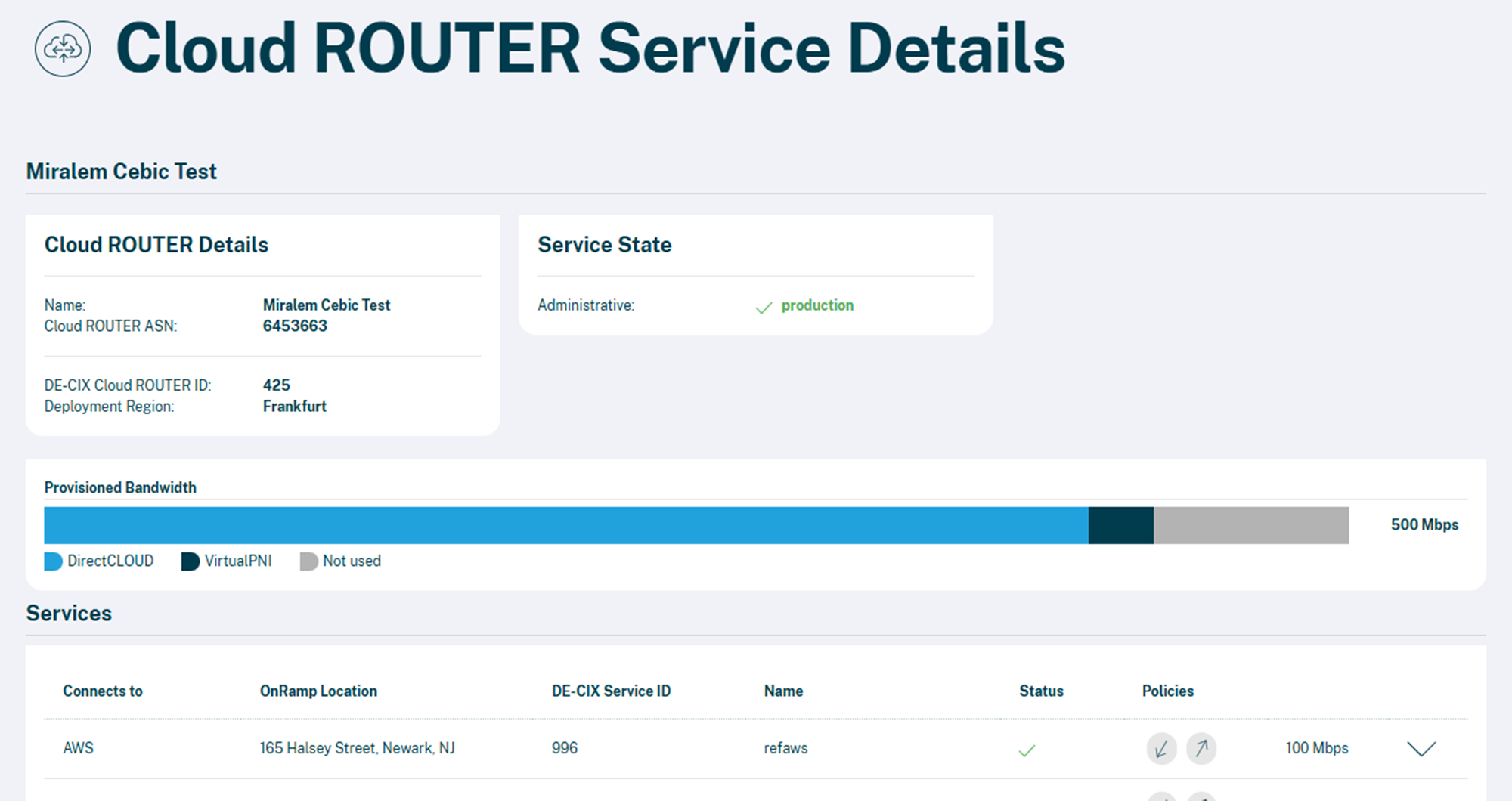
To apply relevant accept and reject policies go back to Cloud ROUTER Service Details.
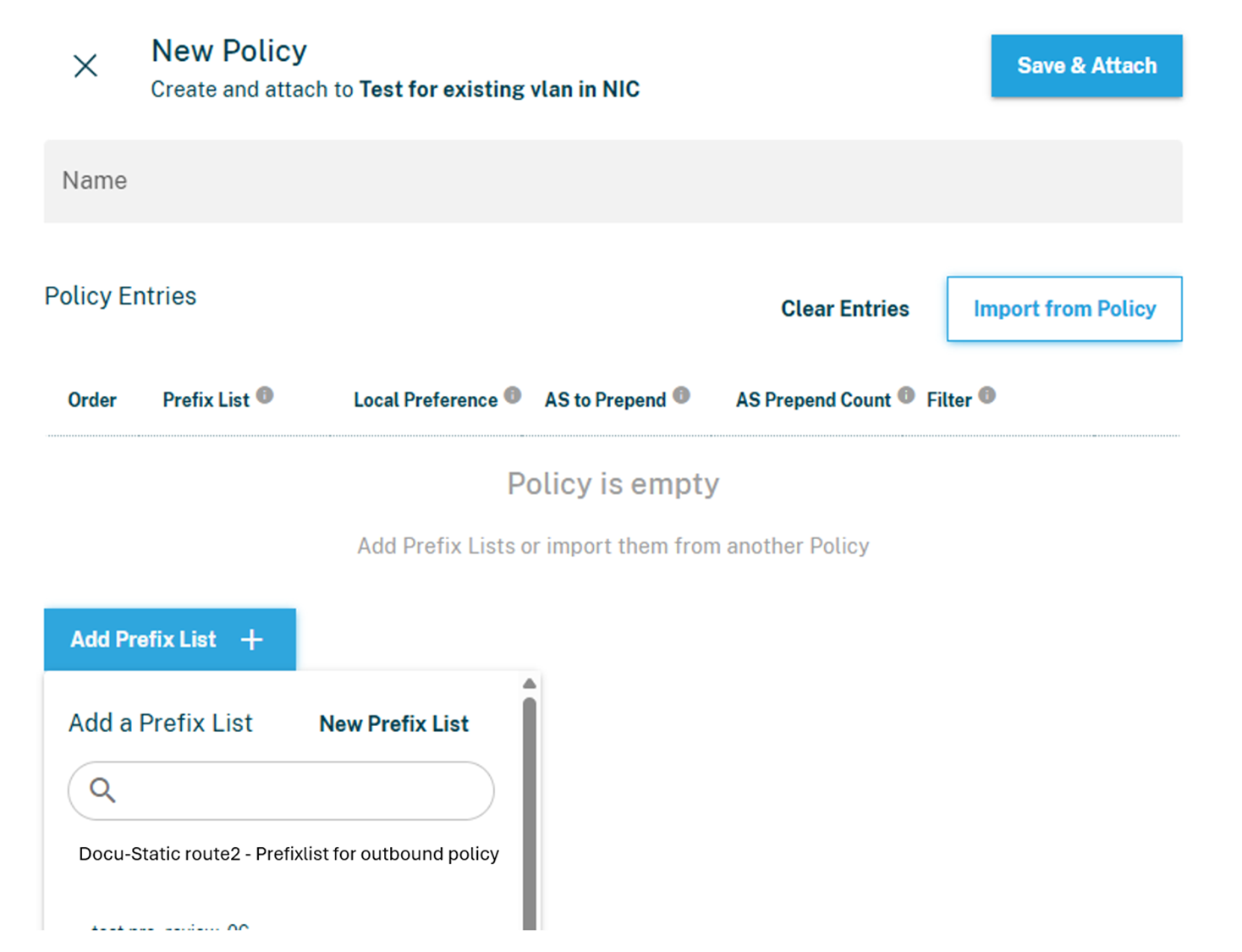
Define a new or adjust your current policy (inbound / outbound). You can add new prefix lists or find the auto-generated prefix list in the list overview.
For details on prefix lists and policies see: Prefix Lists & Policies in Cloud ROUTER
API Configuration
Static and aggregate routes can also be managed via the Cloud ROUTER API.
Typical API operations include:
- Create static or aggregate routes
- Update existing routes
- Delete routes
An aggregate route created via the API is provisioned on all Cloud ROUTER edges and becomes visible in the Portal once completed.
Example: Reducing AWS Prefix Count with Route Aggregation
Scenario
A customer connects Azure and AWS to a Cloud ROUTER. The Azure side announces a large number of prefixes (for example, 100+). AWS enforces a maximum-prefix limit on the BGP session. If the limit is exceeded, the BGP session may be reset.
Example: Learned prefixes from Azure (more-specific routes)
Below is an illustrative subset of prefixes learned from Azure (the real list may contain many more entries):
- 10.8.0.0/30
- 10.8.0.4/30
- 10.8.0.8/30
- 10.8.0.12/30
- 10.8.0.16/30
- … (many more)
Goal: Advertise only one summarized prefix towards AWS while keeping the more-specific routes available within the Cloud ROUTER.
Before: What happens without aggregation
- Azure advertises many more-specific prefixes to the Cloud ROUTER.
- The Cloud ROUTER advertises these more-specific prefixes towards the AWS connection.
- AWS detects that the maximum prefix limit is exceeded.
- Result: the BGP session towards AWS may be reset (routing becomes unstable).
Before – simplified outcome:
- Advertised to AWS: many prefixes (e.g., > 100)
- AWS BGP session: unstable / reset due to prefix limit
Solution Overview
- Create an aggregate route that summarizes the Azure prefixes.
- Automatically generate a prefix list for the aggregate.
- Apply routing policies on the AWS connection so that:
- The aggregate is advertised
- The more-specific prefixes are not advertised
- Apply reject policies on other connections where these routes should not be advertised (if applicable).
Step-by-step configuration (Portal)
Step 1 — Choose an aggregate prefix
Identify a prefix that covers the Azure prefixes you want to summarize.
Using the example above, all shown routes fall into 10.8.0.0/24.So the aggregate route can be:
- Aggregate prefix: 10.8.0.0/24
Note: Choose an aggregate that correctly covers the intended more-specific prefixes. Avoid overly broad aggregation if it would include undesired routes.
Step 2 — Create the aggregate route
- Open your Cloud ROUTER in the Portal
- Go to Advanced Settings → Static Routes
- Click Add Static Route
- Configure:
- IP prefix: 10.8.0.0/24
- Aggregate route: Enabled
- Services/Connections: select the connections where you want to use this aggregate (e.g., include the AWS connection)
- Automatic prefix list: Enabled (recommended)
- Save
Result:
- The aggregate route is created once per Cloud ROUTER and becomes available across attached connections.
- A prefix list for 10.8.0.0/24 is created automatically.
Step 3 — Apply policies on the AWS connection
The goal on the AWS connection is:
- Advertise the aggregate 10.8.0.0/24
- Do not advertise the more-specific prefixes (e.g., 10.8.0.0/30, 10.8.0.4/30, …)
- Navigate to your routing policy configuration for the AWS connection
- Create or update an export policy (routes from Cloud ROUTER towards AWS)
- Add policy rules in this order:
- Accept prefixes matching the auto-generated prefix list (10.8.0.0/24)
- Reject the more-specific Azure prefixes (commonly done by rejecting everything else, depending on your desired routing policy)
Tip: If you already use export policies for the AWS connection, integrate the accept/reject logic carefully to avoid unintended side effects.
Step 4 — Apply reject policies on other connections (if needed)
Because routes exist globally on the Cloud ROUTER, you may need to prevent advertisement on connections where the aggregate (or the underlying more-specifics) are not relevant.
- Apply reject policies on the respective connections, typically by referencing the same prefix list.
After: Expected outcome
After – simplified outcome:
- Advertised to AWS: 1 prefix (10.8.0.0/24)
- AWS BGP session: stable
- Within the Cloud ROUTER: the original more-specific routes remain available for routing decisions
Before vs. After (conceptual)
- Before:
- To AWS: 10.8.0.0/30, 10.8.0.4/30, 10.8.0.8/30, … (many more)
- Risk: AWS max-prefix exceeded
- After:
- To AWS: 10.8.0.0/24
- Result: prefix count reduced, session stable
Validation and Troubleshooting
Validation
- Verify BGP session state in the Portal
- Check advertised routes on the service connection
- Confirm that policies reference the correct prefix list
Common Issues
- Aggregate route created but no policy applied
- Prefix list not attached to the correct connection
- Conflicting accept/reject policies
Notes
- Static and aggregate routes are advertised by default on Cloud ROUTER connections
- Customers must apply appropriate routing policies to control route advertisement
